
Download Chat GPT Photos – AI Image Generator, Free, Secure, Fast
Overview
Chat GPT Photos ist eine hochmoderne Web‑Anwendung, die textuelle Ideen mithilfe künstlicher Intelligenz in hochwertige Visualisierungen verwandelt. Aufbauend auf der leistungsstarken Kombination von OpenAI’s Realistic Vision V1.3 und MidJourney’s Dream Shaper liefert die Plattform Bilder, die von hyperrealistischen Fotografien bis hin zu fantasievollen, traumhaften Kompositionen reichen. Egal, ob Sie ein Marketer sind, der auffällige Social‑Media‑Grafiken benötigt, ein Designer, der schnelle Konzept‑Skizzen sucht, ein E‑Learning‑Ersteller, der ansprechende Illustrationen wünscht, oder ein Künstler, der mit neuen Stilen experimentiert – Chat GPT Photos rationalisiert den kreativen Prozess.
Durch einfaches Eingeben eines Prompts oder Anpassen weniger Parameter interpretiert die KI Ihre Absicht und erzeugt in Sekunden ein visuelles Ergebnis. Das Tool bietet zudem Batch‑Generierung für groß angelegte Kampagnen und spart so Stunden manueller Arbeit. Die cloud‑basierte Architektur ermöglicht das Arbeiten von jedem Gerät mit Internetverbindung, während die zugrunde liegenden Deep‑Learning‑Modelle durch regelmäßige Updates, die die neueste Forschung von OpenAI und MidJourney integrieren, kontinuierlich verbessert werden.
Sicherheit ist integriert: Alle Daten werden während der Übertragung und im Ruhezustand verschlüsselt, und Prompts werden nur so lange gespeichert, wie sie für die Modellverfeinerung benötigt werden. Kurz gesagt, Chat GPT Photos verbindet die Flexibilität textbasierter Eingaben mit der Bildqualität professioneller Anwendungen und positioniert sich als unverzichtbare App für alle, die ihre Kreativität im digitalen Zeitalter verstärken wollen.
Key Features and How to Install
Feature List
- Echtzeit‑KI‑Bildsynthese aus natürlichsprachlichen Prompts.
- Hybrid‑Engine, die Realistic Vision V1.3 (Fotorealismus) und Dream Shaper (künstlerische Note) kombiniert.
- Anpassbare Parameter: Stil, Beleuchtung, Farbpalette, Seitenverhältnis und Auflösung bis zu 4K.
- Batch‑Generierung für umfangreiche Inhaltsbedürfnisse.
- Sichere Cloud‑Speicherung mit Ein‑Klick‑Download in PNG, JPEG oder SVG.
- Regelmäßige Modell‑Updates, um visuellen Trends voraus zu sein.
- Mehrsprachige Unterstützung für globale Teams.
- Integrierte lizenzfreie Bibliothek für schnelle Wiederverwendung.
- KI‑unterstützte Prompt‑Vorschläge, die Anfängern helfen, effektive Beschreibungen zu erstellen.
- Versionshistorie für jedes erzeugte Bild, sodass Sie zu früheren Variationen zurückkehren können.
Installation & First‑Time Use
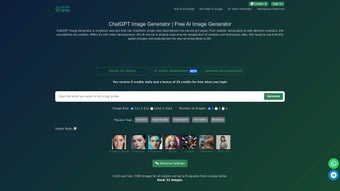
Chat GPT Photos ist eine webbasierte App, das bedeutet, es gibt keinen traditionellen „Installations‑“Prozess wie bei Desktop‑Software. Um zu starten, besuchen Sie die offizielle Website unter chatgptphotos.com. Die Startseite bietet einen klaren „Get Started – Free“-Button; ein Klick registriert ein kostenloses Konto mittels E‑Mail‑Adresse oder einer Single‑Sign‑On‑Option (Google, Microsoft oder Apple). Nach Bestätigung Ihrer E‑Mail gelangen Sie zu einem übersichtlichen Dashboard, in dem das Prompt‑Feld, Stil‑Presets und das erweiterte Einstellungs‑Panel zu finden sind.
Für Nutzer, die eine Desktop‑Verknüpfung bevorzugen, können Sie eine Progressive Web App (PWA) erstellen, indem Sie das „Installieren“-Symbol des Browsers anklicken (verfügbar in Chrome, Edge und Safari). Diese Aktion fügt ein nativen‑aussehendes Symbol zu Ihrem Desktop oder Startmenü hinzu und startet Chat GPT Photos in einem eigenen Fenster ohne das typische Browser‑Chrome. Die PWA cached Ihre letzten Projekte, sodass Sie zuvor erzeugte Bilder offline durchsuchen können, obwohl die Erstellung neuer Bilder weiterhin eine Internetverbindung erfordert, weil die KI‑Modelle auf entfernten Servern laufen.
Sobald Sie eingeloggt sind, geben Sie einfach eine Beschreibung ein, z. B. „a sunrise over a futuristic cityscape, ultra‑realistic, 8k“, und klicken Sie auf „Generate“. Nach wenigen Sekunden erscheint eine Galerie mit Variationen, jede mit einem Thumbnail und einem Confidence‑Score, der anzeigt, wie eng das Ergebnis Ihrem Prompt entspricht.
Sie können die Ergebnisse verfeinern, indem Sie Schieberegler für Stil, Beleuchtung oder Seitenverhältnis anpassen und dann „Regenerate“ oder „Save“ klicken. Die gespeicherten Bilder werden sicher in Ihrem persönlichen Cloud‑Ordner abgelegt und sind von jedem Gerät aus zugänglich, das sich in Ihr Konto einloggt. Export‑Optionen umfassen Direkt‑Download, das Teilen eines öffentlichen Links oder das Einbetten des Bildes in gängige Content‑Management‑Systeme via API‑Key, den Sie in den Kontoeinstellungen erzeugen können.
Fortgeschrittene Nutzer können den „Developer Mode“ erkunden, der JSON‑formatierte Metadaten für jedes Bild bereitstellt, einschließlich Seed‑Werten, Modell‑Version und Verarbeitungszeit. Diese Daten können verwendet werden, um exakt gleiche Ergebnisse zu reproduzieren oder den Generator in eigene Workflows zu integrieren, etwa automatisierte Social‑Media‑Posting‑Bots oder Batch‑Processing‑Pipelines für E‑Commerce‑Produktkataloge.
Compatibility, Pros & Cons
Operating System Support
Da Chat GPT Photos vollständig im Browser läuft, ist es mit allen gängigen Betriebssystemen kompatibel, die moderne Web‑Standards unterstützen. Dazu gehören:
- Windows 10, 11 (Edge, Chrome, Firefox)
- macOS Monterey und später (Safari, Chrome, Firefox)
- Linux‑Distributionen mit aktuellen Browsern (Chrome, Firefox, Brave)
- Android 9+ (Chrome, Firefox, Samsung Internet)
- iOS 14+ (Safari, Chrome, Edge)
Die PWA‑Option erweitert die native‑ähnliche Performance auf Windows, macOS, Android und iOS und bietet schnelle Startzeiten sowie Offline‑Zugriff auf Ihre gespeicherten Assets. Da der Service cloud‑basiert ist, gibt es keine CPU‑ oder GPU‑Anforderungen auf der Client‑Seite, was ihn zu einer idealen Lösung für Low‑Spec‑Geräte, öffentliche Kioske oder gemeinsam genutzte Arbeitsstationen in Bildungseinrichtungen macht.
Pros
- Fast generation: Images appear in seconds thanks to powerful cloud GPUs and optimized inference pipelines.
- High quality: Output rivals professional photography and digital art studios, with detail preserved even at 4K resolution.
- Versatile styles: From photorealism to abstract fantasy, all in one platform, thanks to the hybrid engine.
- Free tier: Generous monthly quota for hobbyists, students, and small teams, reducing entry barriers.
- Secure storage: End‑to‑end encryption protects your prompts, images, and usage analytics.
- Regular updates: New model releases keep the tool ahead of visual trends and improve speed.
- API access: Developers can integrate the generator into apps, marketing automation, or internal tools.
- Prompt assistant: Built‑in suggestions help beginners craft effective prompts quickly.
Cons
- Requires a stable internet connection; offline generation is not possible because the AI runs on remote servers.
- Free tier limits the number of high‑resolution renders per month, which may require upgrading for power users.
- Advanced parameter tweaks have a learning curve for beginners, especially when balancing style versus realism.
- Complex prompts may produce unexpected artistic interpretations, requiring multiple iterations.
- Subscription pricing, while competitive, can add up for large teams that need unlimited high‑res outputs.
Frequently Asked Questions & Final Thoughts
Is Chat GPT Photos really free to use?
Yes, there is a free tier that provides up to 50 image generations per month, with a maximum resolution of 1080p. The free plan also includes access to the basic style library and cloud storage for up to 200 MB of assets. For higher‑resolution outputs, larger batch limits, or commercial licensing, paid plans start at $9.99 per month and scale with usage.
Can I use the generated images for commercial purposes?
Absolutely. All images created under a paid subscription come with a commercial‑use license, allowing you to publish them on websites, advertisements, product packaging, and even in printed media without attribution. Free‑tier images are limited to personal or non‑commercial use unless you upgrade.
What privacy measures protect my prompts and images?
Chat GPT Photos encrypts data both in transit (TLS 1.3) and at rest (AES‑256). Prompt histories are stored only for the duration needed to improve model performance and can be deleted from your account at any time via the privacy dashboard. The platform complies with GDPR and CCPA, offering data‑export and erasure requests on demand.
Do I need any special hardware to generate 4K images?
No. All heavy lifting is performed on remote GPUs in the cloud. Your device only needs a modern browser and a stable internet connection. Even low‑end laptops or tablets can request 4K renders, though download times will depend on your network speed.
How often are new AI models added?
The development team releases model updates roughly every two months, incorporating the latest research from OpenAI and MidJourney to improve realism, style variety, and speed. Major version upgrades are announced in the blog and accompanied by migration guides for existing projects.
Is there an API for integrating Chat GPT Photos into my own apps?
Yes. Paid subscribers can generate an API key in the account settings. The RESTful endpoint accepts JSON payloads containing the prompt and optional parameters, returning a URL to the generated image. Documentation includes rate‑limit details, example code in Python, JavaScript, and cURL, and best‑practice tips for caching results.
Conclusion – Why You Should Download Chat GPT Photos Today
In an era where visual content drives engagement, Chat GPT Photos offers a seamless bridge between imagination and high‑impact imagery. Its blend of photorealistic and artistic AI engines, combined with a user‑friendly web interface, makes it suitable for professionals and hobbyists alike. The free tier lowers the barrier to entry, while premium plans unlock unlimited high‑resolution outputs, commercial rights, and API access—perfect for agencies, e‑commerce sites, and social‑media managers.
Cross‑platform compatibility ensures you can work from Windows, macOS, Linux, Android, or iOS without worrying about hardware constraints, and the secure cloud storage means your assets are always backed up. Regular model upgrades keep the tool relevant as visual trends evolve, and the built‑in prompt assistant speeds up the learning curve for newcomers. If you’re looking to accelerate your design workflow, reduce outsourcing costs, or simply experiment with AI‑generated art, downloading Chat GPT Photos is a logical next step.
Click the “Get Started – Free” button on the official site, create your account, and start turning words into stunning visuals in seconds.
Pros: Fast generation, high quality, versatile styles, secure cloud storage, API access, prompt assistant.
Cons: Requires internet, free tier limits high‑res renders, learning curve for advanced parameters.



.png)



